New feature · 2 min read
Ads and tracking: Meta, TikTok, Google
Connect Meta Pixel, TikTok Pixel, Google Analytics 4 and Google Ads conversions to measure your ads all the way to orders. A Pro feature.
1. Pixels and ad tags
Paste in your Meta Pixel ID, TikTok Pixel, Google Analytics 4 and Google Ads conversion. Your store sends key events to the ad platforms (product views, add to cart, start of checkout and orders) so your ads can be tuned for buyers, not just clicks.
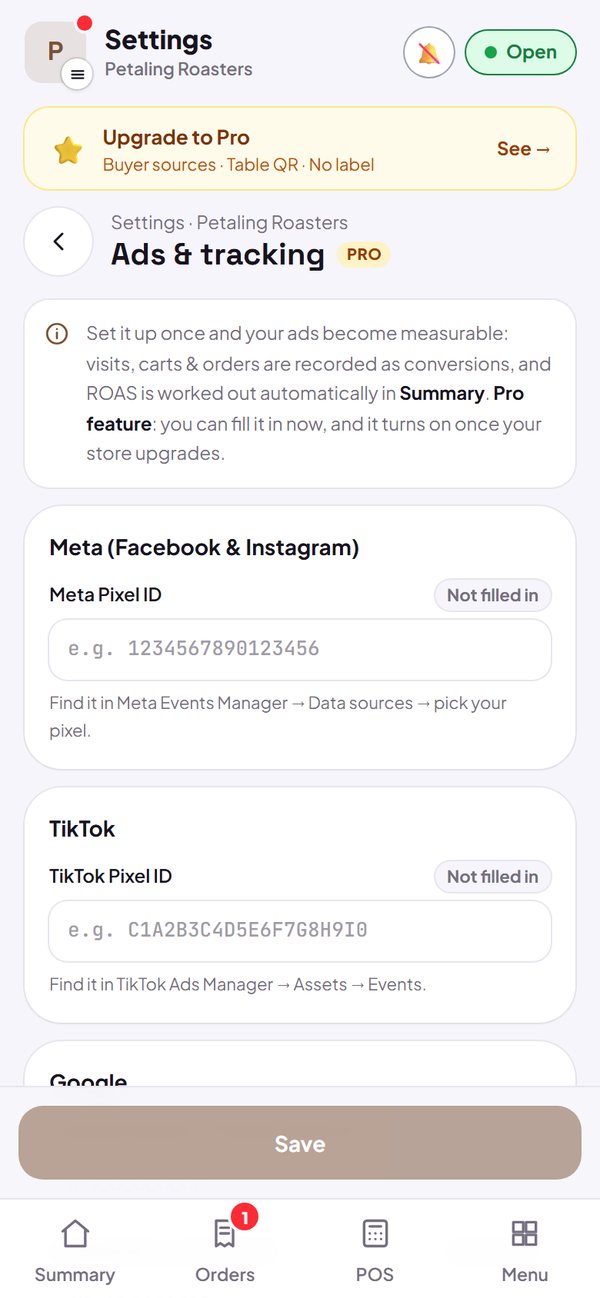
- Visitors are asked first before a pixel is placed in their browser.
- You can enter IDs on the Free plan, they go live once you upgrade to Pro.
- The enquiry form and booking do not send events to ad platforms yet.
How to use it: Settings → Ads & tracking.
2. Server-side tracking
Enter your Meta Conversions API and TikTok Events API tokens, and events are also sent directly from Kedaify's server, so they are still recorded even if a buyer's browser blocks pixels. The Send test button checks that the connection is right.
- Tokens are stored hidden and are not shown again after saving.
How to use it: Settings → Ads & tracking → Server-side tracking.
3. Ad spend, ROAS and product catalogue
Log your daily ad spend per source, and Kedaify works out ROAS (the sales from that source divided by its ad spend) for the time range you choose. For catalogue ads, copy the product catalogue link (feed) from the Ads & tracking page.
- Sales per source are counted from orders that were not cancelled.
- The product catalogue includes products that have a photo.
How to use it: Dashboard → Summary → Sales by source → Ad spend & ROAS.
Questions about this release
Is this feature free?
Ads & tracking is part of the Pro plan. You can enter the IDs now, and tracking goes live once your store upgrades to Pro.
Which events are sent?
View product (ViewContent), add to cart (AddToCart), start checkout (InitiateCheckout) and order (Purchase). Google Ads only receives order conversions.