WhatsApp order formUpdated · 5 min read
A WhatsApp order form that fills itself in
A WhatsApp order form is the set of details a buyer sends with an order: what they want, how many, their name and where it goes. Kedaify fills it in for them from your store link, adds the delivery fee and the total, and sends it to your WhatsApp in one tap.
- Price
- Free, no commission
- Buyers need
- A browser, no sign-up
- Number
- Normal WhatsApp or Business
- Payment
- Straight to your account
A WhatsApp order form template you can copy
If you're not ready for a store yet, a typed form does the job. Save the text below as a quick reply in WhatsApp Business, or as a note on your phone, and send it whenever someone asks how to order.
Ask for the delivery details up front. Most delays come from a missing unit number or a phone number that isn't the recipient's. The landmark line saves riders a call.
Hi! To order, please copy this and fill it in:

Items:
Quantity:
Notes:

Name:
WhatsApp number:
Delivery or pickup:
Address (with unit number):
Landmark:

Payment: bank transfer / PayNow / e-wallet
When a typed form stops being enough
A copied form works while you can count the day's orders on your fingers. The signs that you've outgrown it are usually the same: you copy orders into a notebook at night, buyers ask again what something costs, and an order slips by because its chat sank under newer ones.
An automatic form moves the counting from you to the page. Prices, options, the delivery fee and the total are right before the order reaches your chat, and every order is kept in a list without you writing it down.
- More than five or ten orders a day
- Products with sizes or add-ons
- A delivery fee to work out for each order
- A daily sales total you need to know
Buyers choose, and the prices add up
The automatic version is your store link, for example yourshop.kedaify.com. Buyers open it in their browser, see your items with photos, and add them to a cart. There's no app to install and no account to make.
Choices like size or sugar level come up before the item goes in, with their extra cost. You stop asking which one did you want, and the total that reaches you is right the first time.
One form, including the delivery fee
At checkout the buyer chooses delivery or pickup. For delivery there are fields for the recipient's name, their WhatsApp number, the full address and a landmark. Sharing a map pin is offered but never required.
The delivery fee follows your rule: a flat fee, free above an amount you choose, or confirmed by you on WhatsApp. The buyer sees the items total, the fee and the grand total before sending. Their address can be kept on their phone, so the next order takes a tap.
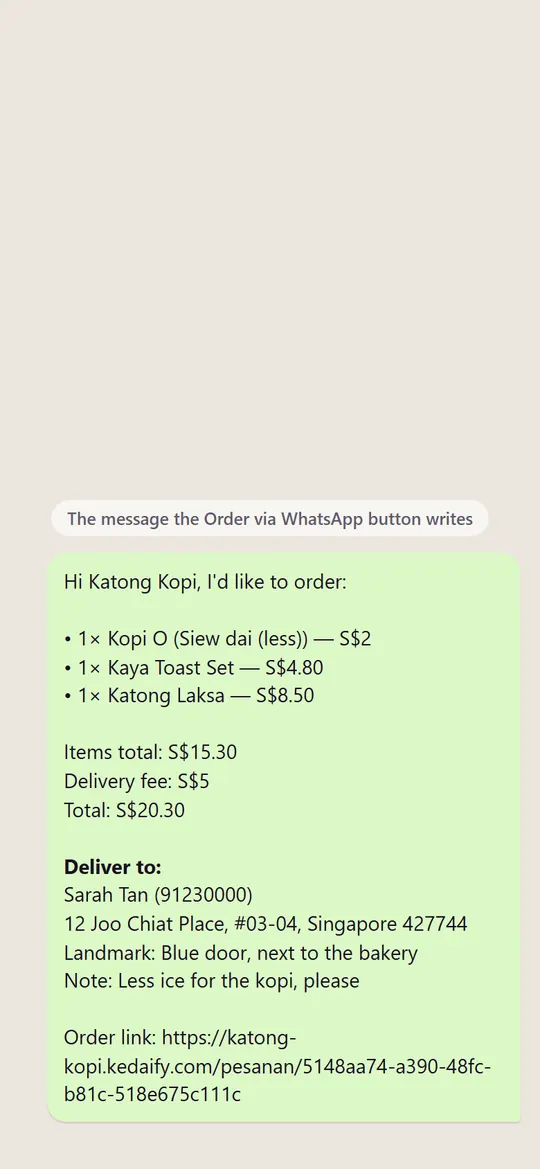
A finished order lands in your chat
Order via WhatsApp opens a chat with your number and the whole form already written: the items, the total, the delivery fee, the name, the address, the landmark and the note. The buyer only presses send.
At the bottom sits a link to the order. Open it from the chat and you can mark the order paid and done, so the record stays right even on days you never open the dashboard.
Paid straight into your account
Instead of sending the order first, a buyer can pay right away by bank transfer. The pay screen shows the exact amount with a copy button and the accounts you've added: a bank account, a PayNow number or an e-wallet number. If you've added your shop's DuitNow or PayNow QR, they can scan that instead and type the amount. They keep a receipt on their phone.
The money goes straight to you. Kedaify never holds a buyer's payment and takes no commission. Once they've paid, the buyer taps I've transferred, and you check your account and mark the order paid.
One page for the order, for both of you
Each order has a status page that the buyer can open again at any time. It shows whether the order has been received, whether you've confirmed the payment, and whether it's done, without a single is it ready message.
On your side, every order also lands in the dashboard's order list, and your phone can ring with a notification even when the dashboard is closed. Orders you mark done count towards the day's sales total.
How to start
- Create a free storeSign in with Google or email, pick your country and enter the WhatsApp number that takes orders.
- Add your itemsAdd each item with a price, a photo and any choices like size or add-ons.
- Set deliveryTurn on delivery, pickup or both, and choose how the delivery fee is worked out.
- Send the linkShare your store link with customers, or make it your WhatsApp Business quick reply.
What's free, and what Pro adds
These lists come straight from the plans as they are today.
Free
Free for good.
- A cart that reaches your WhatsApp as one tidy message
- Delivery or pickup. You set the delivery fee: flat, free above an amount, or confirmed on WhatsApp
- Payment by your own DuitNow or PayNow QR, or straight to your bank account or e-wallet, with a receipt the buyer can keep
- Buyers pay from the order link and tap I've paid; you check, then mark it paid
- The order link rides along in the WhatsApp message, so the order can be updated from the chat
- Every order in one list, marked paid and done as you go
- An order status page, and reviews from real buyers
- A notification on your phone when an order comes in, even with the dashboard closed
- No commission. Buyers pay you directly, and Kedaify never holds the money
Pro
Your first store gets Pro free for 14 days. Outside Indonesia, Pro is then US$3.99 a month or US$29.99 a year by card.
- Buyer sources & funnel. Where buyers come from and where they drop off.
- CSV export. Every order into Excel for your books.
- Meta, TikTok & Google pixels. Your ads learn who buys, plus server-side conversions.
What it can't do yet, and who it suits
Better to know now than after you've set it up.
What it can't do yet
- Payments aren't confirmed automatically. You check your account, then mark the order paid
- The delivery fee isn't a courier's live rate. It's flat, free above an amount, or confirmed on WhatsApp
- Kedaify doesn't send messages to customers in bulk
A good fit for
- Sellers whose WhatsApp orders have grown past what a notebook can hold
- Home bakers, caterers and cafés that need an address and a note with each order
- Small shops that want their own order link without building a website
Not a good fit for
- Shops that need every payment confirmed automatically
- Businesses that want automatic replies or a chatbot on WhatsApp
Questions people ask
What is a WhatsApp order form?
The details a buyer sends to a seller on WhatsApp to place an order: the items, the quantity, a name and an address. It can be text the buyer copies and fills in, or a page that fills it in for them, like a Kedaify store link.
How do I make an automatic WhatsApp order form?
Create a free Kedaify store, add your items and your WhatsApp number, then share your store link. Buyers choose items and enter their address, and the finished order arrives in your chat.
Do buyers have to sign up or install an app?
No. They open the link in their browser and send the order with WhatsApp.
Can I use a normal WhatsApp number?
Yes. The button opens a chat with the number you enter, so normal WhatsApp and WhatsApp Business both work.
Can it charge a delivery fee?
Yes. Choose a flat fee, free delivery above an amount, or a fee you confirm on WhatsApp for each order.
Is it only for food?
No. A store can be a café, a bakery, a clothing shop or a grocery. The order flow is the same: cart, form, then the chat.