WhatsApp catalogUpdated · 6 min read
A free WhatsApp catalog with a cart that sends the order to your chat
Kedaify turns your products into a catalog link that opens in any browser. Buyers pick items and options, the cart adds up the total, and one tap sends the order to your WhatsApp. It's free, takes no commission, and works for shops in any country, with prices in their own currency.
- Price
- Free, no commission
- Buyers need
- A browser, no app
- Countries
- Any country
- Currencies
- Your country's own, written the local way
Two kinds of WhatsApp catalog
When people say WhatsApp catalog they usually mean one of two things. The first is the catalog built into the WhatsApp Business app: products listed inside WhatsApp, shared with a wa.me/c link, browsed without leaving the chat. The second is a catalog link: a small web page with your products that ends in a WhatsApp message.
They suit different moments. The built-in catalog is handy when buyers are already chatting with you. A link works anywhere a link can go: your Instagram bio, a Facebook post, a Google Maps listing, a printed QR at the counter. It also opens for people who haven't saved your number yet. Plenty of shops keep both.
| Catalog in WhatsApp Business | Kedaify catalog link | |
|---|---|---|
| Opens in | The WhatsApp app | Any browser |
| Your address | A wa.me/c link | yourshop.kedaify.com |
| Delivery fee and total | Worked out in the chat | Added up before sending |
| Paying | Details sent in the chat | A screen with the exact amount |
| After ordering | The chat history | A status page for the order |
Photos, sections and a search box
Your catalog opens on your store's front page: your name, logo, opening hours and whether you're open right now, then your products in the sections you choose. Each product can carry up to five photos and a full description, and you can show the list in one, two or three columns.
Buyers who know what they want can type it. The search box filters as they type, so a shop with a few hundred items still feels small. Sold-out items stay visible but can't be added, which saves you a round of sorry, that one's finished.
- Sections in the order you set
- Up to five photos per product
- Sold out shown, never sold by mistake
Sizes, milk, extra shots: each with its own price
Most of the back-and-forth on WhatsApp is about options. Which size? Oat milk or regular? Extra shot? With Kedaify the choices appear before the item goes into the cart, each with its own price, so the buyer picks once and you never have to ask.
An option can be required, like a size, or a free add-on list, like toppings. The price on the button moves as they choose, which means the total that reaches your chat is already right.
A cart that does the sums
The cart lists what the buyer chose, with each line's price and the total in your currency. They can change a quantity or remove a line without starting over. If you run a promo or give out a voucher code, the discount shows here before the order is sent.
The cart is kept on the buyer's phone for a day, so someone who browses at lunch and orders after work finds their items still there.
The order arrives as one tidy message
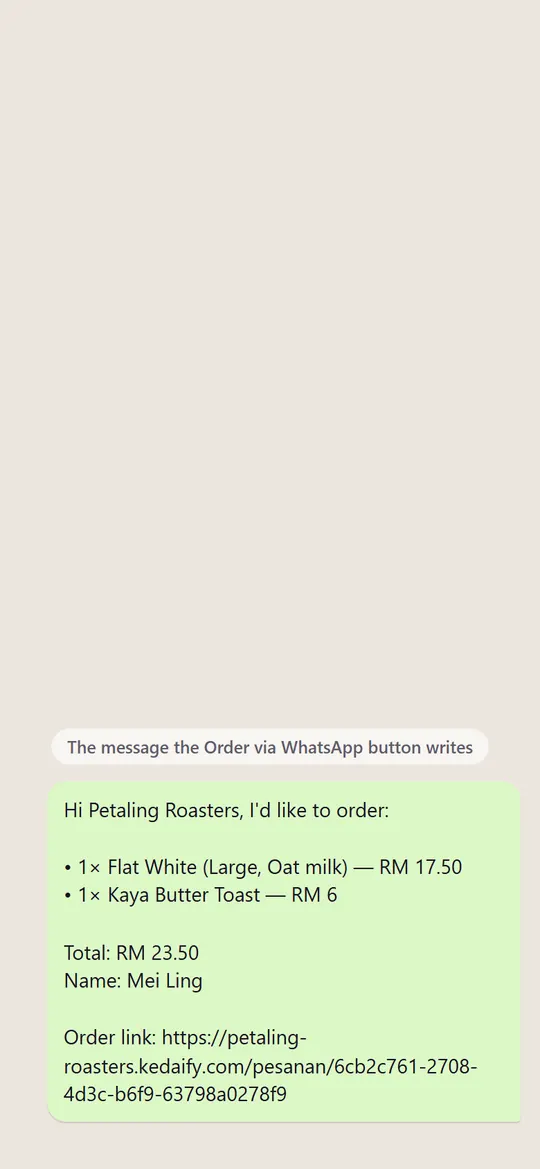
When the buyer taps Order via WhatsApp, WhatsApp opens a chat with your number and the order already typed: every item with its options, the prices, the total, their name and any note. They press send, and the order sits in your chat in the same layout every time.
Because the format never changes, you can read an order at a glance and nothing needs retyping. Your replies stay in your own WhatsApp, normal or Business, so talking to customers works the way it always has.
Buyers can check their order without asking
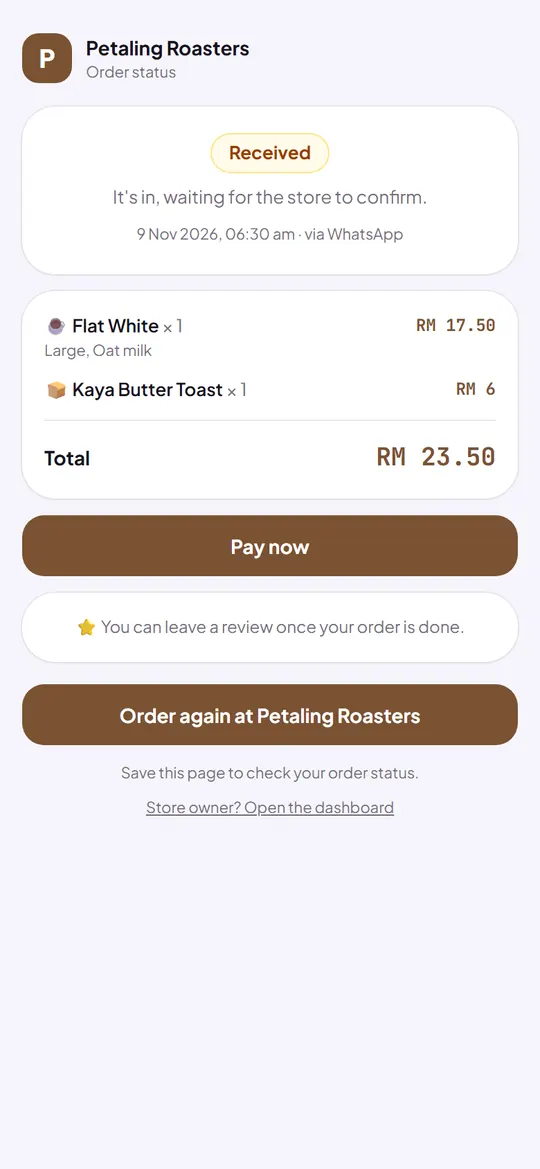
Every order gets its own page, and the link travels in the WhatsApp message. The buyer can open it again at any time to see that the order was received, that you've marked it paid, and that it's done. That's one fewer is my order ready message for you to answer.
The same page lets them order the same things again in one tap, and leave a review once the order is done. Reviews show on your store as coming from real buyers.
How to start
- Create a free storeSign in with Google or email. Your country comes from your connection or your WhatsApp number, and prices follow its currency.
- Add your productsAdd a photo, a price and any options for each product, sorted into sections.
- Add how to payAdd your DuitNow or PayNow QR, bank account or e-wallet number, so buyers can pay you straight.
- Share the linkPut yourshop.kedaify.com in your WhatsApp profile, your bio and your quick replies.
What's free, and what Pro adds
These lists come straight from the plans as they are today.
Free
Free for good.
- A photo catalog with categories and search, in 1, 2 or 3 columns
- Options and add-ons with their own price, like size, milk or toppings
- A cart that reaches your WhatsApp as one tidy message
- Sale prices, automatic promos and voucher codes
- An order status page, and reviews from real buyers
- Stock per product, counted down with every sale
- Your own link: yourshop.kedaify.com
- No commission. Buyers pay you directly, and Kedaify never holds the money
- Up to 100 products on the free plan, 10,000 on Pro
Pro
Your first store gets Pro free for 14 days. Outside Indonesia, Pro is then US$3.99 a month or US$29.99 a year by card.
- Up to 10,000 products. Plus bulk upload from Excel or Shopee, and bulk photos.
- Buyer sources & funnel. Where buyers come from and where they drop off.
- No Kedaify label. Your store and receipts without “Made with Kedaify”.
What it can't do yet, and who it suits
Better to know now than after you've set it up.
What it can't do yet
- Stores in India sell in rupees, with bank transfer and WhatsApp ordering. UPI payment links aren't built yet
- Payments aren't confirmed by themselves. You check your bank or e-wallet, then mark the order paid
- Kedaify doesn't read or answer chats. Replies stay in your own WhatsApp
- The free plan holds up to 100 products
A good fit for
- Shops that already sell on WhatsApp and want buyers to stop typing out their orders
- Cafés, home bakers and small food businesses with options like sizes and add-ons
- Clothing, grocery and gift shops with up to a few hundred products
Not a good fit for
- Shops that need card payments confirmed on the spot
- Businesses that want a chatbot to answer on WhatsApp for them
Questions people ask
What is a WhatsApp catalog?
A list of your products that buyers can browse and order from through WhatsApp. It can be the catalog inside the WhatsApp Business app, or a web page like a Kedaify store link that sends the finished order to your chat.
Is the Kedaify catalog really free?
Yes. The free plan has no time limit and takes no commission on orders. It holds up to 100 products. Pro adds more, and your first store can try it free for 14 days.
Do my buyers need to install anything?
No. The link opens in their phone's browser. The order goes through WhatsApp, or straight to you when they pay to your payment QR or bank account, if you've added them.
Does it work with a normal WhatsApp number?
Yes. The order button opens a chat with whatever number you enter, so normal WhatsApp and WhatsApp Business both work.
Can I use it with my WhatsApp Business catalog?
Yes. They don't get in each other's way. Many shops keep the catalog inside WhatsApp for people already chatting, and share the link everywhere else.
Which countries does it work in?
Any country. Prices are in your country's currency, written the local way, and your WhatsApp number works with its country code. Indonesia, Malaysia and Singapore also get their own payment QR.