Kedaify
Kedaify plans

One store, three plans. Tap a plan, see its screens.

Your store and dashboard are the same on every plan. What changes is which tools are open. The prices are at the bottom.

Your business
Starting a new bill for Table 3 in the demo café, adding a V60 and a kaya toast, and Table 3 showing under open bills
Table 3 stays open until they pay.

Real screens from a demo store

Open your store and take orders today

What's in Free

  • Your page at yourstore.kedaify.com
  • Up to 100 products
  • Orders from your link land in the dashboard
  • POS, receipts and stock per product
  • Cash, QR and transfer, split if needed
Start here if

You're just starting to sell online, or you have fewer than 100 products.

Open your online shop and sell at the counter today

What's in Free

  • Your shop at yourstore.kedaify.com
  • Up to 100 products, with sizes and colours
  • Orders from your link land in the dashboard
  • POS with barcode scanning, then a receipt
  • Stock per product, flagged when it runs low
Start here if

You're just starting to sell online, or you stock fewer than 100 products.

Take bookings and questions, every one recorded

What's in Free

  • Your page at yourstore.kedaify.com
  • A booking form with a date and time
  • Every booking and question lands in Leads
  • POS for bookings paid on the spot
  • Receipts, shared or printed
Start here if

Customers book or ask before they come, and you want it all in one place.

No Kedaify label, and your profit in plain sight

Everything in Free, plus:

  • No label, up to 10,000 products
  • Table QR codes, posters and kitchen tickets
  • Bills per table, tax and service
  • Gross and net profit, and a daily break-even target
  • Recipes and ingredient stock, unpaid bills, pre-orders
Move up when

Orders come in every day, and you want table QR codes, kitchen tickets or your profit each day.

No Kedaify label, and the profit on every product

Everything in Free, plus:

  • No label, up to 10,000 products and bulk upload
  • Unpaid bills: who still owes, part payments
  • Profit per product, expenses and a daily break-even target
  • Stock in with the purchase price, and stock counts
  • Pre-orders, printed orders and buyer sources
Move up when

Orders come in every day, some customers pay later, or you stock more than 100 products.

No Kedaify label, and you know where customers come from

Everything in Free, plus:

  • No Kedaify label on your page and receipts
  • Lead sources: Instagram, Google, WhatsApp or direct
  • The funnel: where people drop off before booking
  • Meta, TikTok and Google pixels for your ads
  • A QR poster for the front desk, and CSV export
Move up when

Bookings come in every week, and you've started promoting or running ads.

Branches, a team and the books in one store

Everything in Pro, plus:

  • Up to 5 branches in one store
  • A team of up to 10, cashiers sign in with a PIN
  • Stock per branch, moved between them
  • Profit and loss, cash flow and balance sheet
  • Your accountant can read, not change
Move up when

You open a second branch, or staff take turns at the till.

Branches, a team and the books in one store

Everything in Pro, plus:

  • Up to 5 branches in one store
  • A team of up to 10, cashiers sign in with a PIN
  • Stock per branch, moved between them
  • Profit and loss, cash flow and stock value
  • Your accountant can read, not change
Move up when

You open a second branch or a stockroom, or staff take turns at the till.

Branches and a team in one business

Everything in Pro, plus:

  • Up to 5 branches in one business
  • A team of up to 10, cashiers sign in with a PIN
  • Leads and the POS per branch
  • Profit and loss and cash flow from POS sales
  • Your accountant can read, not change
Move up when

You open a second branch, or staff take turns at the front desk.

What your customers see

The store page, the cart, booking and the question form. Every plan has them, Free included.

Your business

Demo: Petaling Roasters, a café. Customers open your link, pick from the menu and send the order.

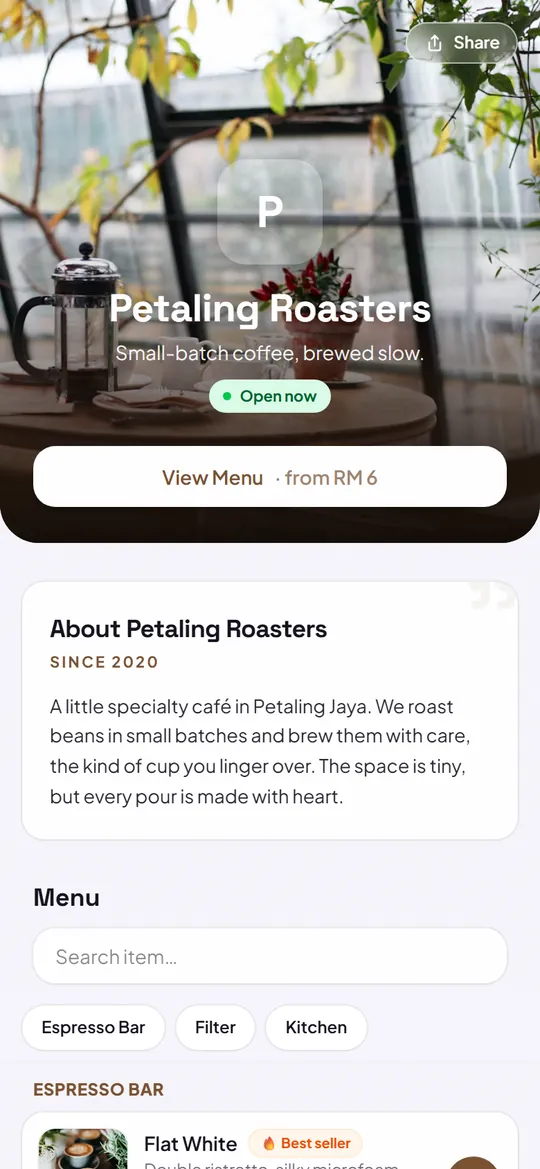
  1. Top of the Petaling Roasters demo store: cover photo, name, tagline, open now and the menu button

    1Store pageYour name, cover photo and opening hours, at your own link.

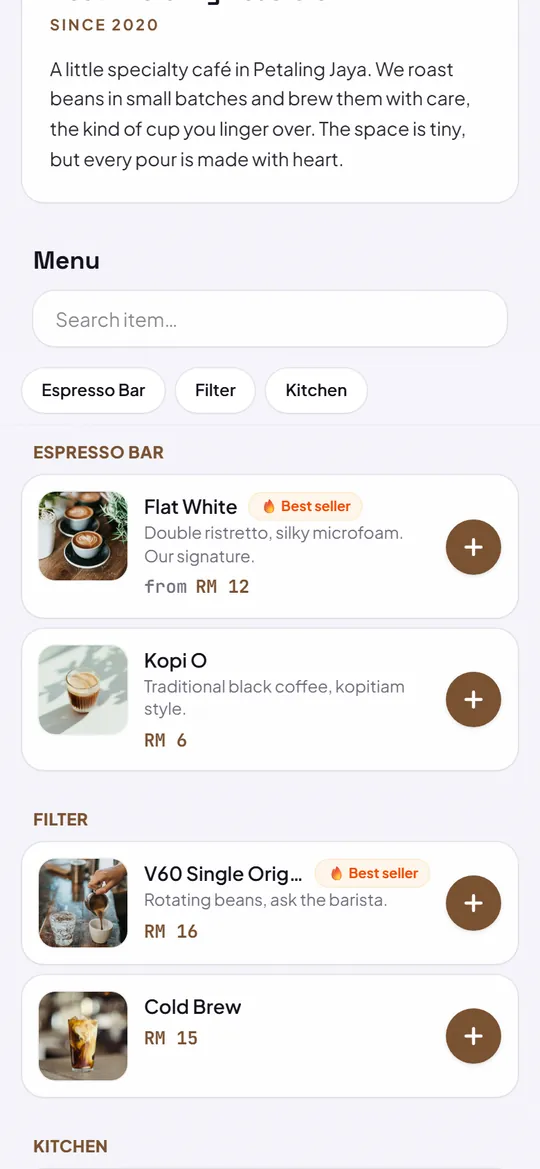
  2. The Petaling Roasters menu: search, categories, then items with photos and prices in ringgit

    2MenuPhotos and prices, grouped by category.

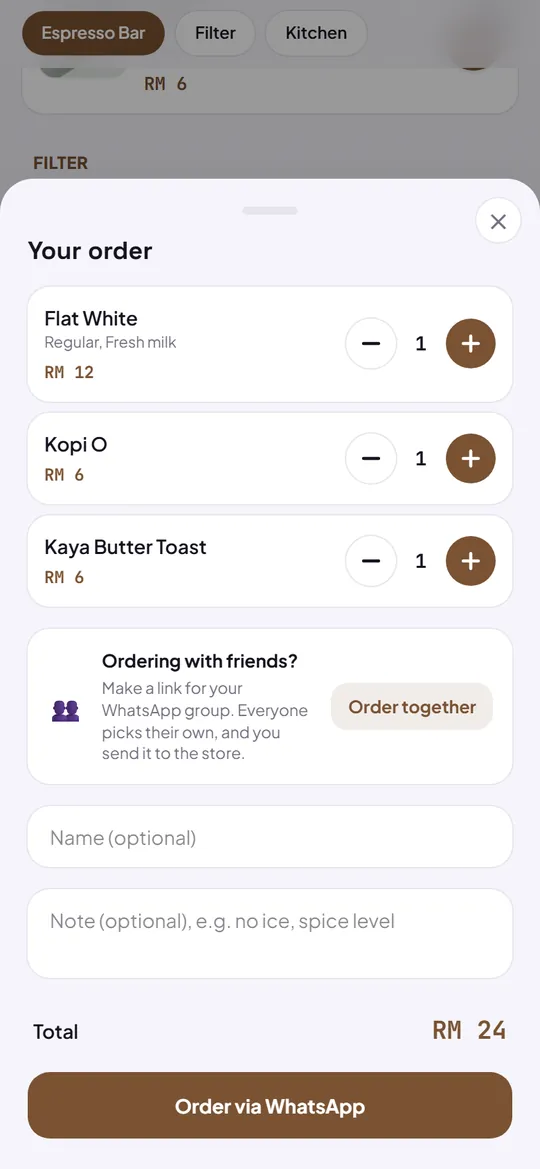
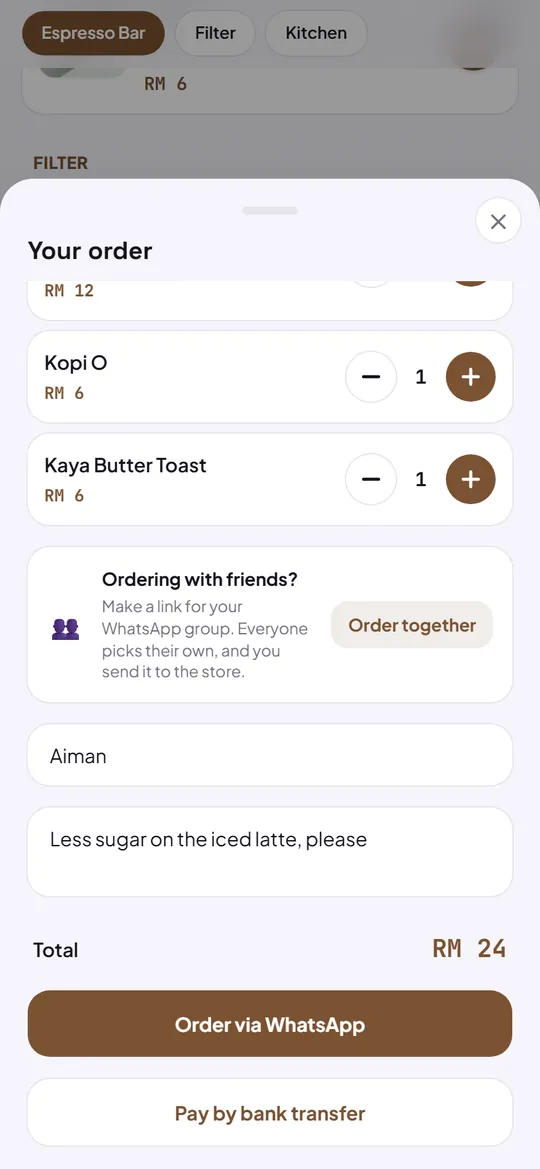
  3. The cart with three items, their amounts, prices and the total

    3CartCustomers set the amounts and see the total straight away.

  4. The order form with a name and a note filled in, the total, then the WhatsApp and bank transfer buttons

    4Send the orderBy WhatsApp or bank transfer. The order is saved in your dashboard.

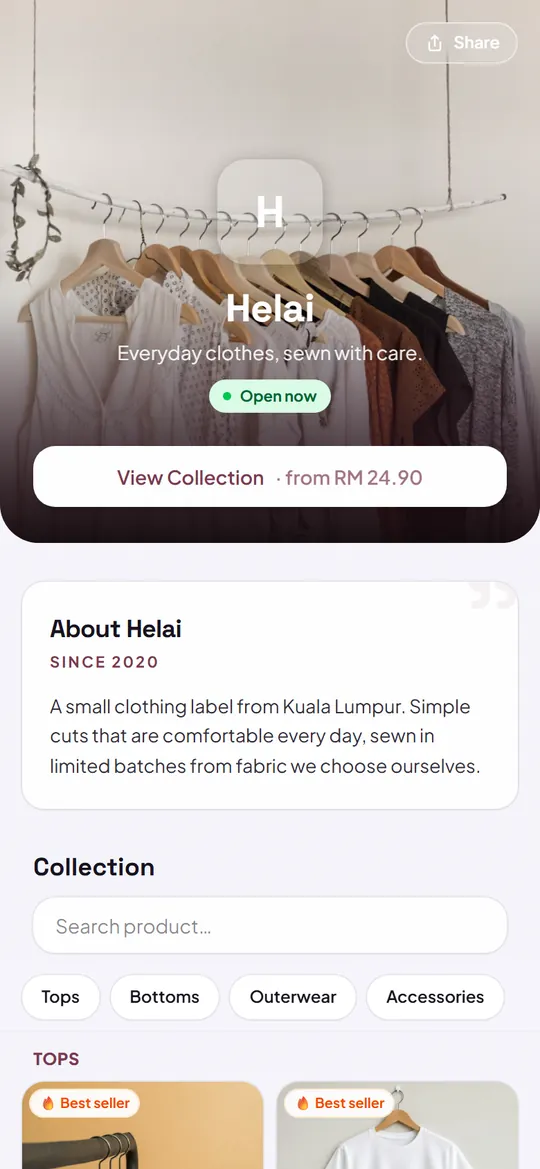
Demo: Helai, a clothing shop. Customers pick a piece and its size, then order.

  1. Top of the Helai demo shop: cover photo, name, tagline and the collection button

    1Shop pageCover photo, name and a button to your collection.

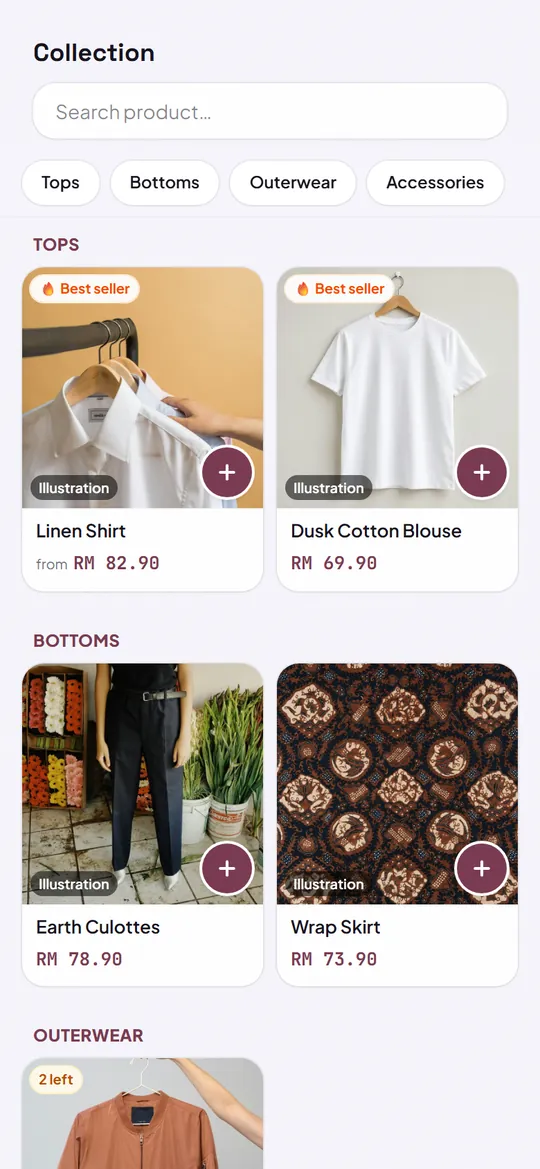
  2. The Helai collection: categories, then clothes with photos and prices in ringgit

    2CollectionProducts with photos and prices, best sellers marked.

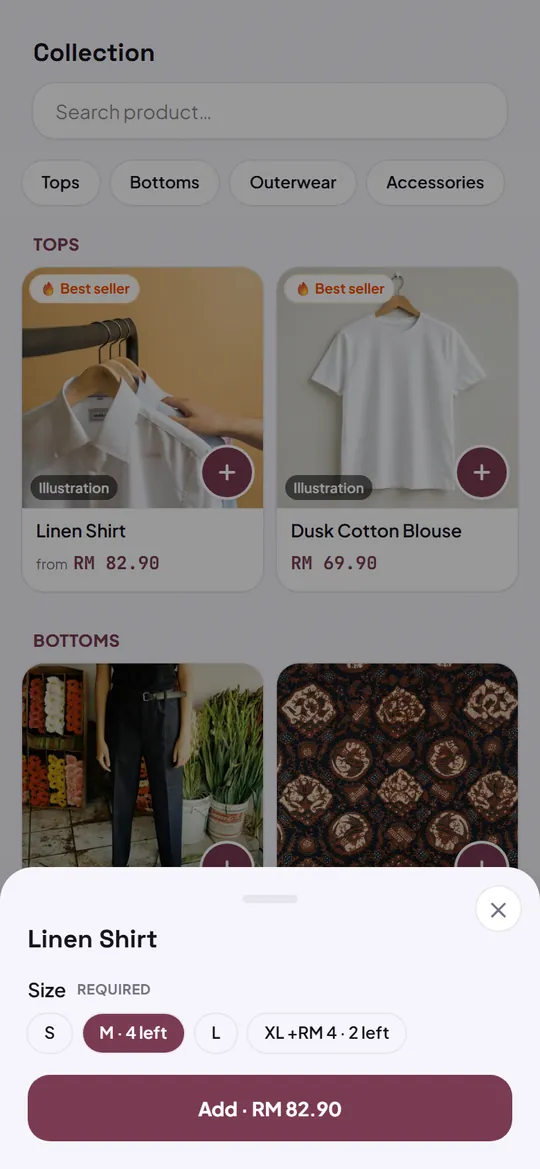
  3. Sizes for the linen shirt: M picked with 4 left, then the Add button

    3Pick a sizeSize or colour on one screen, with what's left in stock.

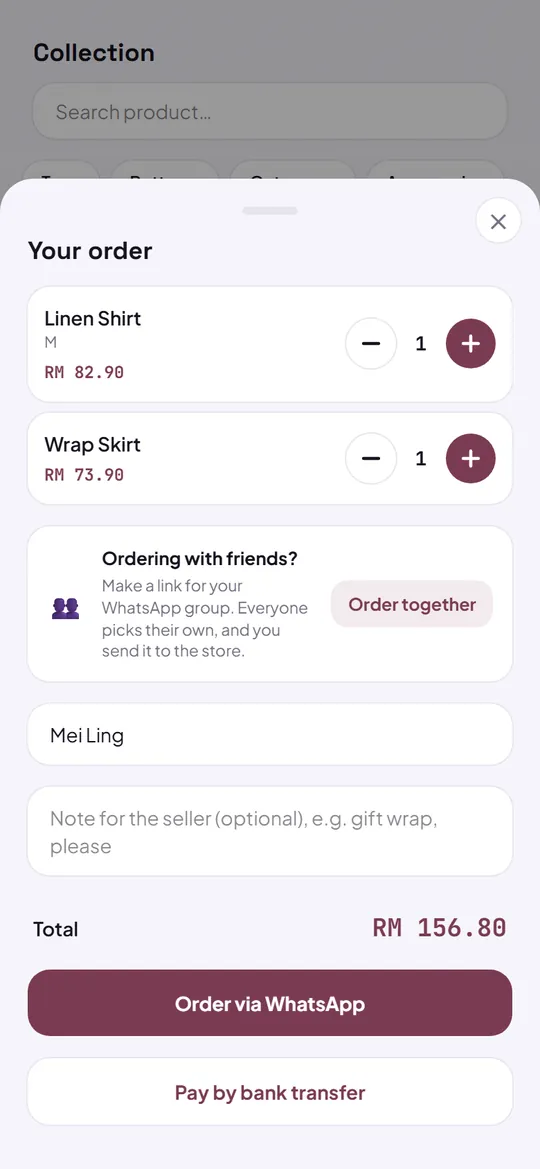
  4. The cart with the shirt in size M and culottes, the buyer's name, the total, then the WhatsApp and bank transfer buttons

    4CartThe size goes with the order. Then WhatsApp or bank transfer.

Demo: Sekar Salon for bookings, and Ruang Koding, a coding class, for a business people usually ask first.

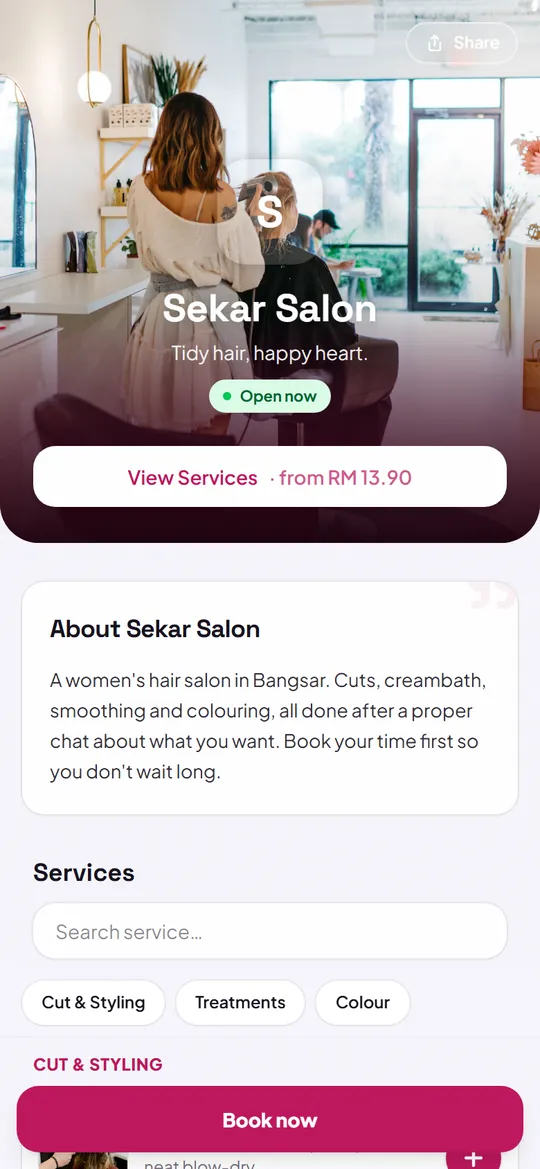
  1. Top of the Sekar Salon demo page: cover photo, name, tagline and the services button

    1Business pageCover photo, name and a booking button that stays in view.

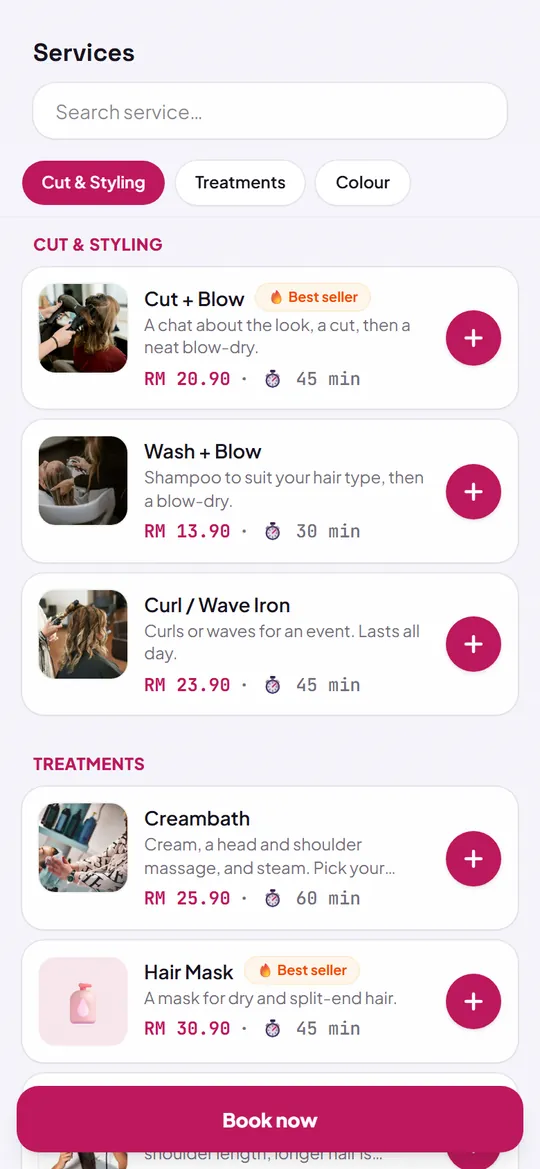
  2. The Sekar Salon services with prices and durations, and the Book now button

    2ServicesThe price and length of each service.

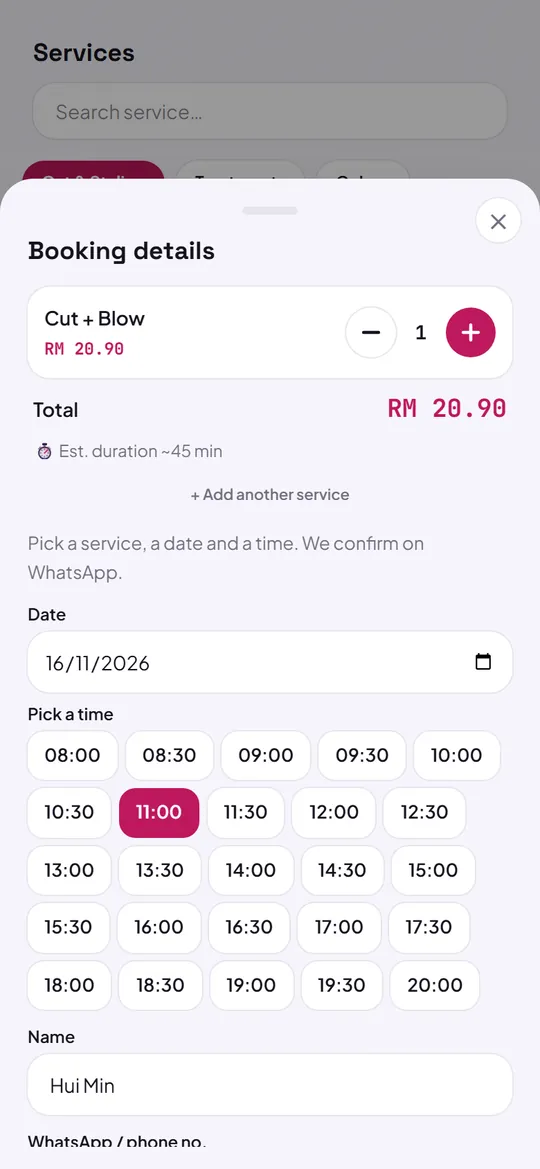
  3. The Sekar Salon booking form: the service, total, date, the time picked and the name

    3BookingCustomers pick a date and a time. It lands in your Leads.

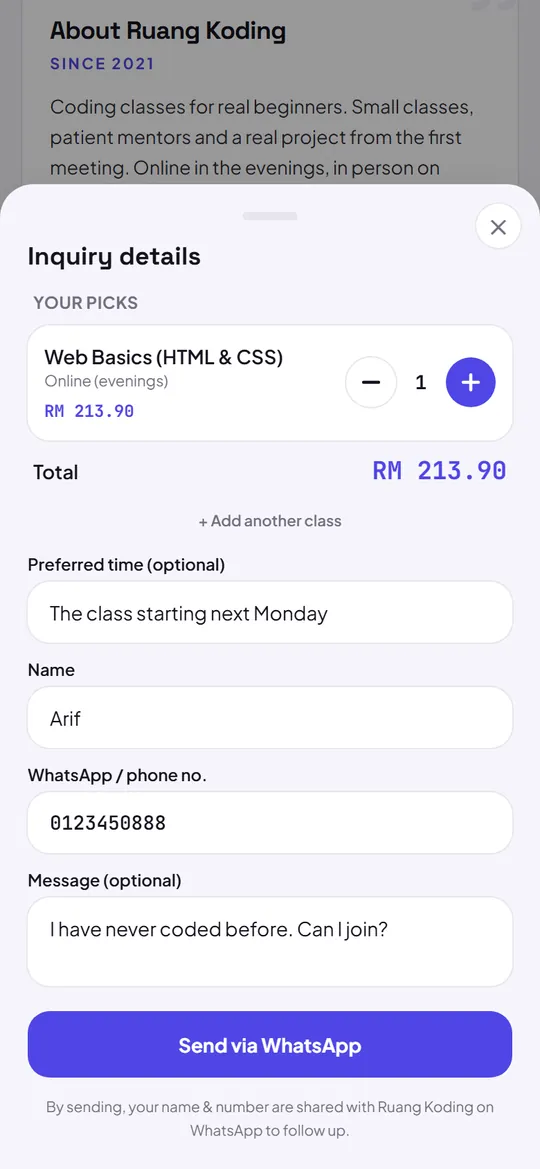
  4. The question form of the Ruang Koding demo class: the class picked, a preferred time, name, number and a message

    4Question formFor a business people ask first, like a class. The question lands in your Leads too.

The same screen, two plans

The two you'll notice first: the screen you open every day, and the label on your store.

Your summary

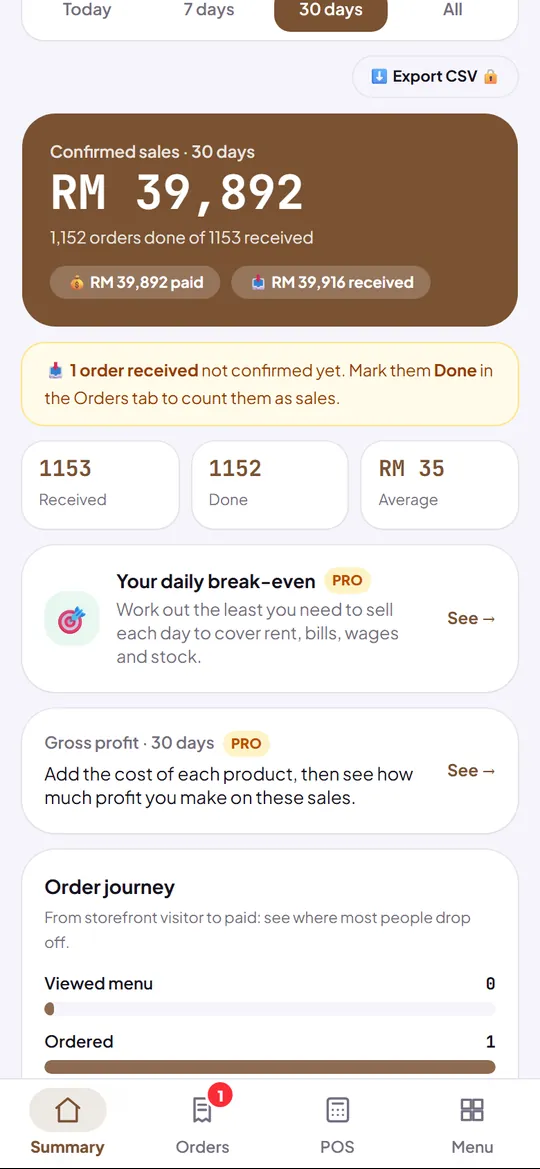
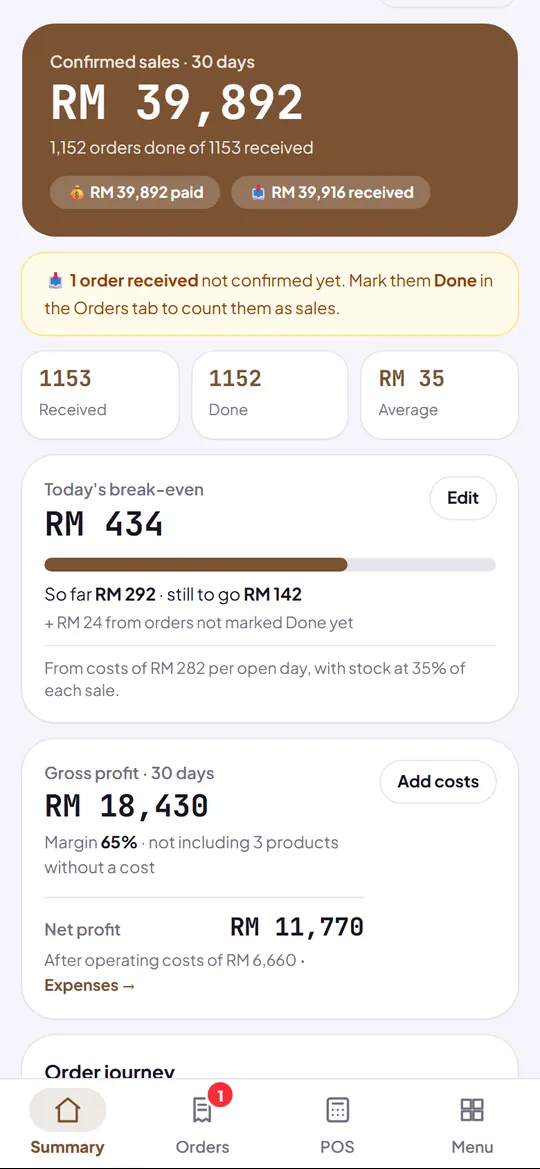
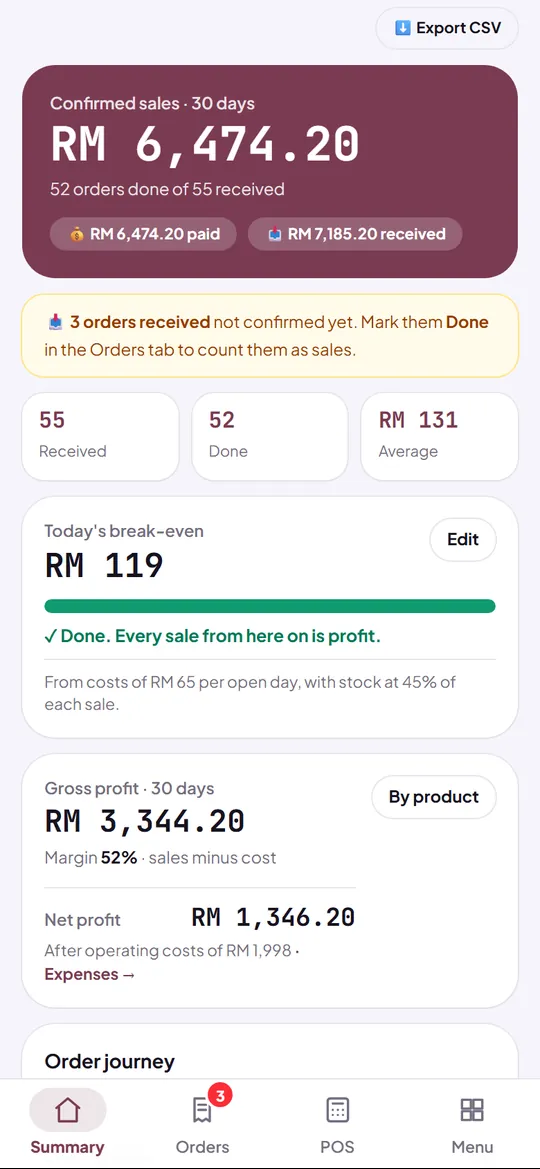
The screen store owners open most. Free shows your sales and best sellers. On Pro, your profit and daily target are on the same screen.
Free
The demo café's summary on the Free plan: sales, then the profit row locked
Sales and best sellers
Pro
The same summary on the Pro plan: sales, profit and the daily target
Plus profit and a daily target

Your summary

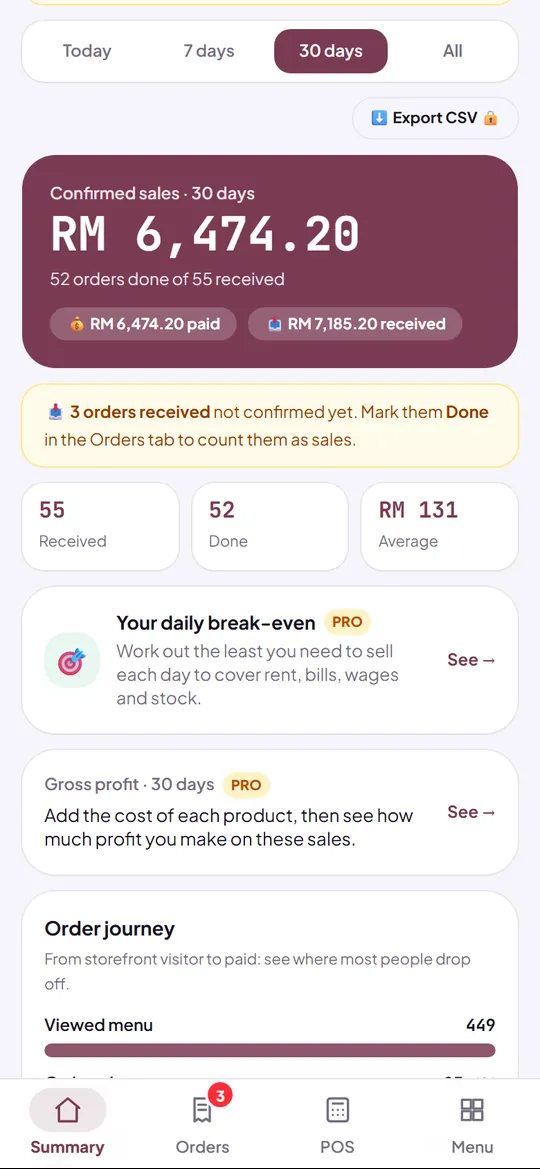
The screen store owners open most. Free shows your sales and best sellers. On Pro, your profit and daily target are on the same screen.
Free
The Helai demo shop's summary on the Free plan: sales, then the profit row locked
Sales and best sellers
Pro
The Helai demo shop's summary on the Pro plan: sales and profit
Plus profit and a daily target

Leads

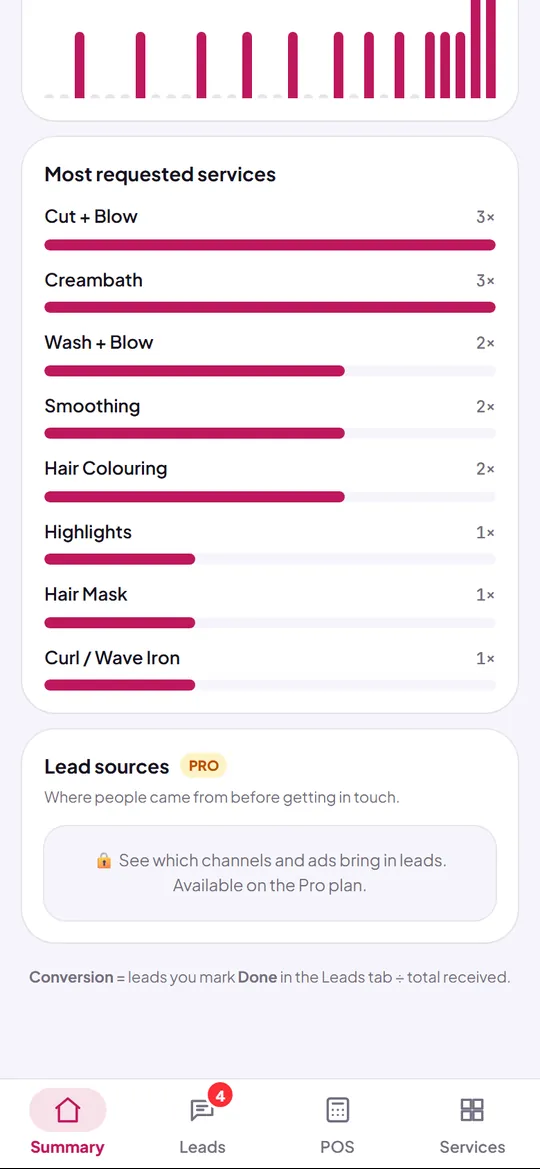
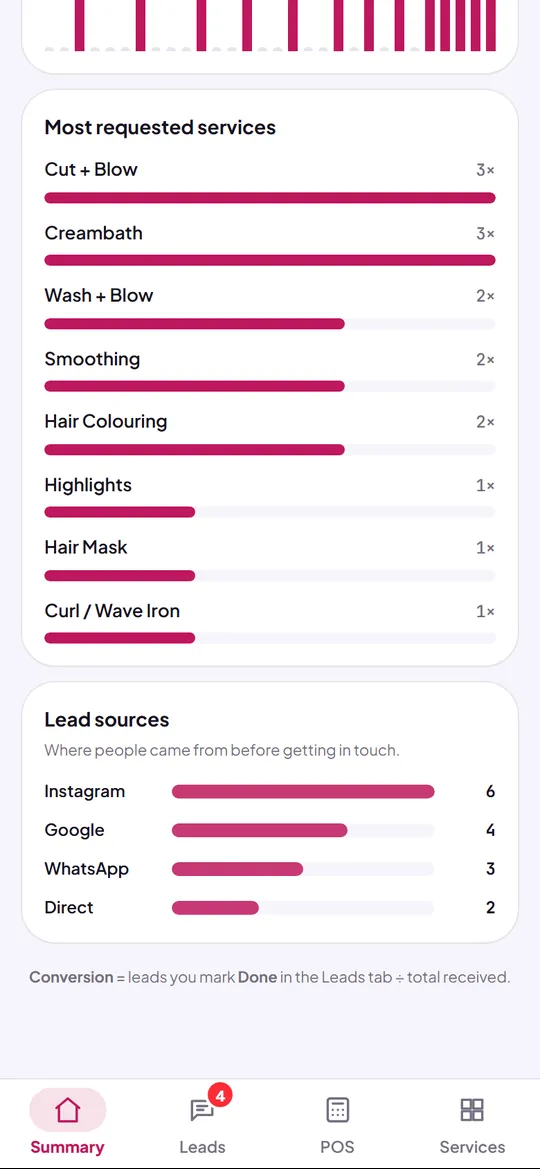
On Free, every booking and question is recorded. On Pro, you also see where they came from and where the others dropped off.
Free
The Sekar Salon demo's leads summary on the Free plan, with the sources locked
Every booking recorded
Pro
The Sekar Salon demo's leads summary on the Pro plan, with sources and the funnel
Plus sources and the funnel

The label on your store

Free shows a small Made with Kedaify label at the bottom of your store and receipts. On Pro it's gone.

Free
A small label at the bottom
Pro
No label
Free
A small label at the bottom
Pro
No label
Free
A small label at the bottom
Pro
No label

Everything Pro opens

The full list for your kind of business. Switch the kind above and the list follows.

Reports & profit

  • Monthly report NewThis month against the same days last month: sales, gross profit, expenses, net profit.
  • Daily break-even target NewThe least to sell each day to cover your costs, and how far today has got.
  • Expenses & net profit NewRecord rent, wages, power and purchases with a photo of the bill, and see your net profit.
  • Gross profit & margins NewProfit per product from its cost or recipe, tax and service left out.
  • Busy hours NewYour busiest hours and days, to plan stock and shifts.
  • CSV exportEvery order into Excel for your books.

Buyers & ads

  • Buyer sources & funnelWhere buyers come from and where they drop off.
  • Meta, TikTok & Google pixelsYour ads learn who buys, plus server-side conversions.
  • Ad spend & ROASRevenue per source divided by its ad spend, every day.

A more pro store

  • No Kedaify labelYour store and receipts without “Made with Kedaify”.
  • Table QR & QR posterGuests scan at the table and order; a poster ready to print.
  • Pre-orders NewPre-orders on your store's link: a closing time, stock as the quota, a ready date and the recap.
  • Up to 10,000 productsPlus bulk upload from Excel or Shopee, and bulk photos.

POS & kitchen

  • Bills per table, tax & service NewOpen a bill per table, pay at the end; tax and service on the receipt.
  • Stock & ingredients NewRecipes take their ingredients on every sale; stock in, counts and restock lists are kept.
  • End of day & Z report NewCount the drawer at every close; the difference is kept, print the Z report.
  • Kitchen ticketsPrint orders for the kitchen in one tap; only additions print again.
  • Unpaid bills NewWho still owes and how much, part payments, and a one-tap WhatsApp reminder.

Reports & profit

  • Monthly report NewThis month against the same days last month: sales, gross profit, expenses, net profit.
  • Daily break-even target NewThe least to sell each day to cover your costs, and how far today has got.
  • Expenses & net profit NewRecord rent, wages, power and purchases with a photo of the bill, and see your net profit.
  • Gross profit & margins NewProfit per product from its cost or recipe, tax and service left out.
  • Busy hours NewYour busiest hours and days, to plan stock and shifts.
  • CSV exportEvery order into Excel for your books.

Buyers & ads

  • Buyer sources & funnelWhere buyers come from and where they drop off.
  • Meta, TikTok & Google pixelsYour ads learn who buys, plus server-side conversions.
  • Ad spend & ROASRevenue per source divided by its ad spend, every day.

A more pro store

  • No Kedaify labelYour store and receipts without “Made with Kedaify”.
  • Up to 10,000 productsPlus bulk upload from Excel or Shopee, and bulk photos.
  • Pre-orders NewPre-orders on your store's link: a closing time, stock as the quota, a ready date and the recap.
  • Store QR posterA QR poster ready to print for your window and counter.

POS & stock

  • Unpaid bills NewWho still owes and how much, part payments, and a one-tap WhatsApp reminder.
  • End of day & Z report NewCount the drawer at every close; the difference is kept, print the Z report.
  • Stock in & counts NewRecord deliveries with their purchase price, count stock, and send restock lists to suppliers.
  • Print ordersPrint each order to pack it: items, quantities, options, notes and the total.

Customers & ads

  • Lead sources & funnelWhere leads come from and where they drop off.
  • Meta, TikTok & Google pixelsYour ads learn who sends the form, plus server-side conversions.

A more pro store

  • No Kedaify labelYour store and receipts without “Made with Kedaify”.
  • Up to 10,000 productsPlus bulk upload from Excel or Shopee, and bulk photos.
  • Store QR posterA QR poster ready to print for your front desk.

Reports

  • Monthly report NewThis month against the same days last month: sales, gross profit, expenses, net profit.
  • CSV exportEvery lead and booking into Excel.

BusinessBusiness: everything in Pro, plus branches, a team and the books.

Row by row

The POS, receipts and stock are already in Free. Here's what changes as you move up.

Row by rowFreeProBusiness
Store
Store page at yourstore.kedaify.com
Products10010,00010,000
Small Made with Kedaify labelShownNoneNone
Your colours, logo and About page
Discounts and vouchers
Your own domainOn request
Orders and payment
Orders from your link, recorded in the dashboard
Payment QR and bank transfer, buyer taps I've paid
Booking form and Leads inbox for service businesses
Unpaid bills: who still owes, part payments
Table QR codes and QR poster
Pre-orders on your store's link
POS
POS: cash, QR, transfer, split payments
Receipts, shared or printed to a Bluetooth printer
Stock per product and barcode scanning
Bookings paid at the POS for service businesses
Bills per table, tax and service
Kitchen tickets
Close the till and Z report
Recipes and ingredient stock
Reports and ads
Sales summary and best sellers
Gross profit, expenses and net profit
Daily break-even target
Busy hours
Buyer sources, ad pixels and ROAS
CSV export
Branches and team
Branches11Up to 5
Team: cashiers with a PIN, managers, accountantUp to 10 people
Stock per branch, moved between them
Manager PIN for discounts and voids
Compare branches and cashiers
The books
Profit and loss, and cash flow
Balance sheet and stock value
Export for your accountant

In every plan, Free included

  • No commission per order

    However many orders you take, Kedaify takes nothing from them.

  • Money goes straight to you

    Buyers pay to your own payment QR or bank account.

  • Every order is recorded

    Each order lands in your dashboard first, then the chat can follow.

  • Move up any time

    Your products, orders and data come with you. If a plan ends, the store keeps running on Free.

Try it first, pay if it fits

  1. Today: your store is ready

    Your first store gets Pro for 14 days. Every Pro tool is open, nothing to pay.

  2. Day 14: you choose

    Subscribe to Pro if it helps. If not, the store goes back to Free and keeps running. Products, orders and data stay.

  3. Any time: try Business

    Opening a second branch or bringing in staff? Try Business for 14 days from the dashboard.

Common questions

About paying and the trial. The price of each plan is right below.

Is Free really free?

Yes. No time limit and no commission per order. Free holds up to 100 products and shows a small Made with Kedaify label on your store and receipts.

How does paying work?

Outside Indonesia, Pro and Business are monthly or yearly subscriptions, paid by card through Polar. They renew until you cancel. Cancel any time and the plan stays on until the end of the period you paid for.

Do you take a cut of my sales?

No. Buyers pay to your own payment QR or bank account. The money never passes through Kedaify.

What happens when the trial ends?

Your store keeps running on Free. Products over 100 stay on sale and can be edited; you just can't add new ones.

When do I need Business?

When you have more than one branch, or staff who take turns at the till and need their own sign-in. One store without staff is fine on Pro.

Selling in Indonesia?

Stores in Indonesia pay in rupiah, once up front for 1, 3, 6 or 12 months, with no automatic renewal. The rupiah prices are on the Indonesian page.

Pricing

Pick how you pay

Monthly or yearly, by card. No commission per order, and you can cancel any time.

The plan you're viewing

Free

Store, orders, POS and stock.

US$0forever

no commission per order

Start free
The plan you're viewing

Pro

No label, table QR codes and profit reports.

US$3.99/ month

billed monthly

US$29.99/ year

US$47.88Save 37%about US$2.50 a month

Try Pro for 14 days
The plan you're viewing

Business

Branches, a team and the books.

US$12.99/ month

billed monthly

US$109.99/ year

US$155.88Save 29%about US$9.17 a month

Try Business for 14 days
  • Renews until you cancel. If a plan ends, the store goes back to Free and keeps running.
  • Selling in Indonesia? See the prices in rupiah