POS & bookkeeping · 5 min read
Free POS app for small shops and home businesses: 7 things to check
This question comes up all the time in small business groups: which POS app is free, easy to use, and can give a receipt? The answer depends on your business. Before you install any app, check the seven things below. At the end there is a short section on what POS in Kedaify can and can't do yet, so you can compare.
1. Can it give receipts?
There are two kinds of receipt. A digital receipt is an image sent to the buyer's WhatsApp or saved to a gallery. A printed receipt comes from a thermal printer. For a home business a digital receipt is often enough; a printer helps when buyers come in person and queue.
If you want to print, most small shops use a 58 mm Bluetooth thermal printer. Make sure the app supports that printer on the phone you use. A POS app that runs in a browser can't print to a Bluetooth printer from an iPhone yet, because the iPhone browser doesn't support it.
2. Does it keep working when the signal drops?
In a busy hour, a signal that drops for a moment shouldn't stop your sales. Look for an app that keeps recording sales while offline, then sends them by itself when you are back online, without you entering anything twice.
3. Can it take cash, QR and bank transfer?
For cash, the app should work out the change. For QR payments there are two kinds: a static QR (one code for every sale, the buyer types the amount) and a dynamic QR (the amount is already filled in). A static QR is the easiest to use because you just display the code, as long as you always check the amount that comes in.
Record bank transfer, cards and e-wallets as separate payment methods too. Later, when you count the drawer, you know how much should be cash.
4. Does stock go down by itself?
If you sell items you count, such as bottled drinks or groceries, choose an app that reduces stock with every sale and tells you when something runs out. For food made to order, a "sold out" switch per menu item is usually enough.
5. Are the reports enough to know your profit?
At the least you need sales per day, number of sales, best sellers, and the total for each payment method. To know profit, the app must also record your cost per product, because gross profit = sales - cost of the goods sold.
At the end of the day, an end-of-day report helps you match the money in the drawer with your cash sales.
6. How far does "free" go?
Many POS apps have a free version with limits. Check the limits before you move your data: the number of products or sales, which features are locked, the app's brand name on receipts, and what the monthly price is if your business gets busier.
A one-off purchase feels cheaper, but ask who fixes problems and whether there are updates. A monthly subscription usually keeps getting updates, but the cost keeps running.
7. Does it run on the phone you already have?
To start, you don't need to buy a POS machine. An Android phone or iPhone you already own is usually enough, plus a thermal printer if you need printed receipts. An app that runs in the browser needs no install and opens on any phone, tablet or laptop.
A tablet or a dedicated POS machine starts to make sense when queues are long and you have more than one person at the till.
If you use POS in Kedaify
POS is in your Kedaify store dashboard and runs in the browser, so you can open it on Android, iPhone, a tablet or a laptop. Products come from your store menu, so your online store and your POS use the same product list.
What is free: selling from the menu with size or flavour options, cash with change, your own QR payment code, bank transfer, cards and e-wallets, paying with two methods, discounts and vouchers, items outside the menu, cancelling a sale, stock that goes down by itself, digital receipts, printing to a 58 mm Bluetooth printer from Chrome on Android or a laptop, and recording sales when the signal drops. The Free plan covers up to 100 products, and receipts carry a small Kedaify line.
What Pro adds: end of day with the Z report, gross profit and margin per product, your busiest hours, and receipts without the Kedaify line. A new store gets a free trial of Pro. See Pricing.
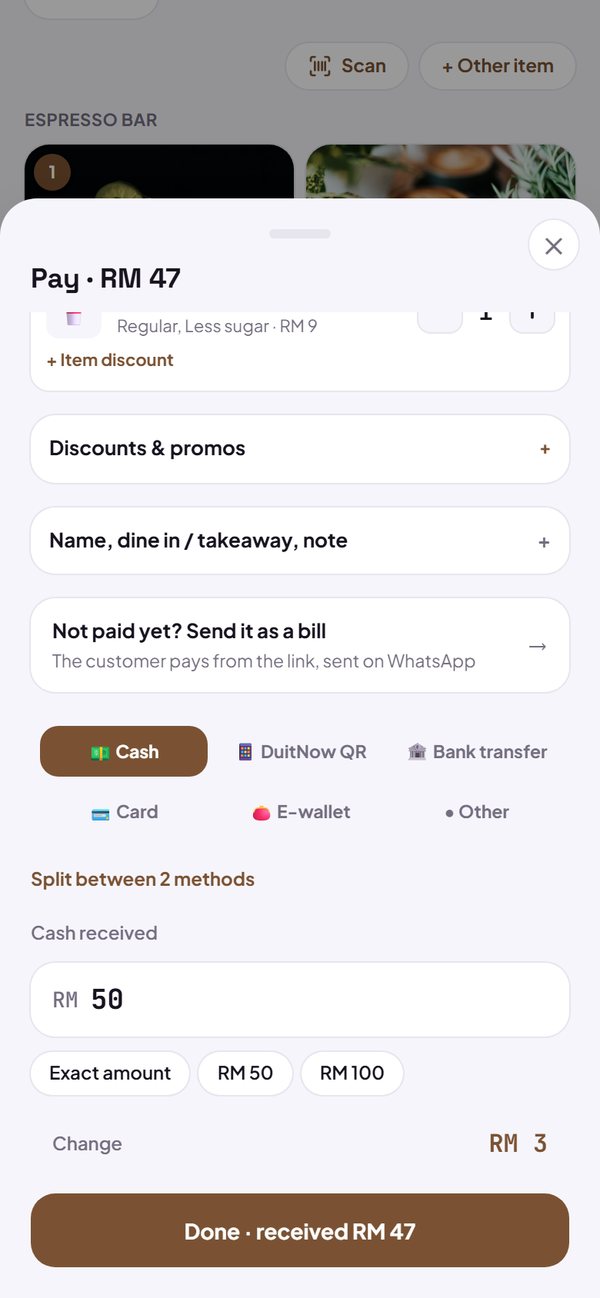
- Printing from an iPhone isn't possible yet; recording sales and digital receipts still work.
Questions sellers ask
Is there a free POS app that can print receipts?
Yes. First check that the app supports a Bluetooth thermal printer on the phone you use. In Kedaify, POS and printing receipts to a 58 mm Bluetooth printer are free, from Chrome on Android or a laptop.
Do I need to buy a POS machine to start?
No. The phone you already have is enough to record sales and send digital receipts. Add a thermal printer if you need printed receipts.
Can I use it on an iPhone?
POS in Kedaify opens on an iPhone in the browser, to record sales and share digital receipts. Printing to a Bluetooth printer isn't possible from an iPhone yet.
What is the difference between a static and a dynamic QR code?
A static QR uses one code for every sale and the buyer types the amount. A dynamic QR makes a new code with the amount already filled in for each sale.