New feature · 1 min read
Your store in the Kedaify directory
The Kedaify store directory shows small stores that are ready for orders, with product photos, logo, city and search.
In the Kedaify store directory, shoppers can browse stores made with Kedaify, grouped by type of business. Each card shows a product photo, the logo, the city and the number of products, and links straight to your store. The page can also be read by search engines like Google.
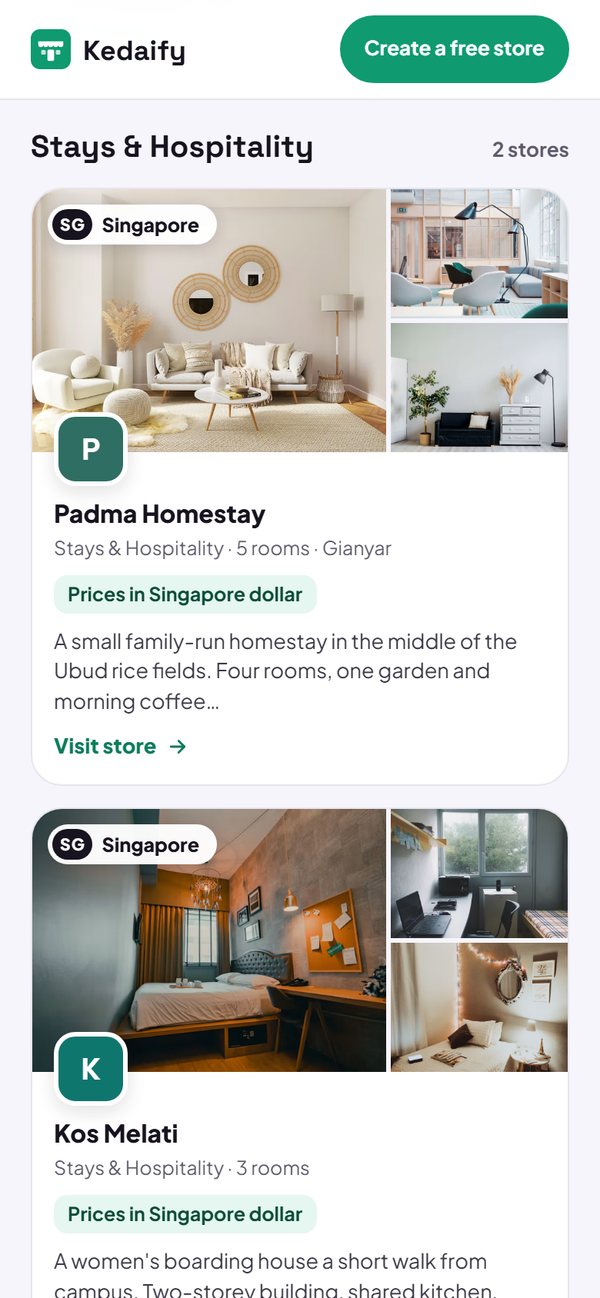
- Shown automatically once your store has products and a way to order, such as WhatsApp.
- The sample products from sign-up need to be replaced with your own first.
- Use your real WhatsApp number, sample numbers are not shown.
How to use it: Automatic, no need to sign up.
Questions about this release
Why isn't my store showing yet?
Make sure your store has at least one product you made yourself (not a sample product from sign-up) and a way to order, such as a real WhatsApp number. The list is refreshed regularly, so wait about 15 minutes.
Can I keep my store out of the directory?
Yes. Email [email protected] with your store address.